
The feature of bookmarks in all popular browsers has always equipped users with a holistic approach to their favorite websites and platforms with just a single click. No one is going to remember the entire URL or website address rather the present world needs some sort of shortcut even on the internment. That is the reason why the bookmarks section in your browser Firefox, Chrome, or Safari becomes so important that visiting interesting websites offers a cakewalk to you!
The above descriptions state the increasing significance of bookmarks to anyone and thus; it becomes prominent for the interested user to create a backup for their favorite URLs. Yes, this backup will be of great use to you if your system needs changes in the browser options or upgrading or downgrading a specific version of a browser like Chrome so that there is no chance left of losing data and a URL list of favorite websites.
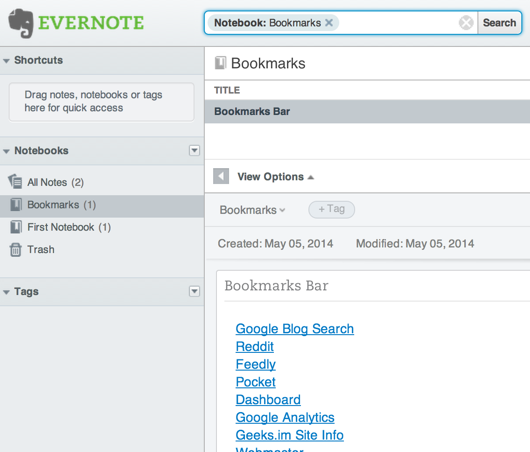
Experts suggest that exporting all the bookmarks to an HTML file can serve as an essential method to create a backup for favorite URLs from any browser. Booknote Importer is a crucial app for Mac users that will transfer and save all the bookmarks to the Evernote location.
Steps to transfer and save bookmarks to Evernote notebooks
- Simply export bookmarks from the browser.
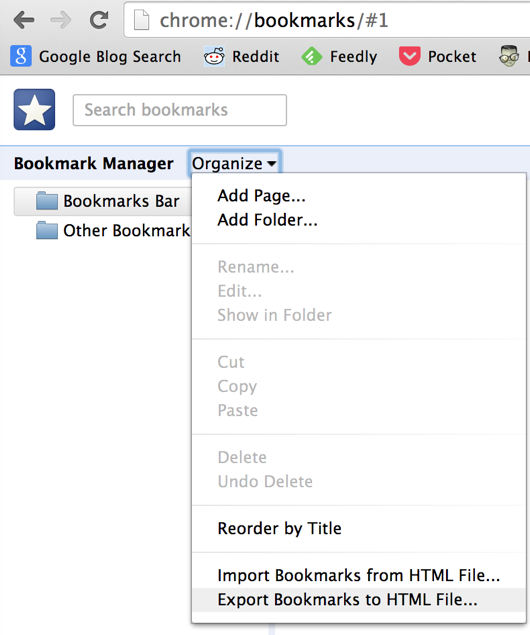
- Chrome users should click on the menu button located at the top-right corner and go to Bookmarks>Bookmark Manager>’ Export Bookmarks to HTML File..’.
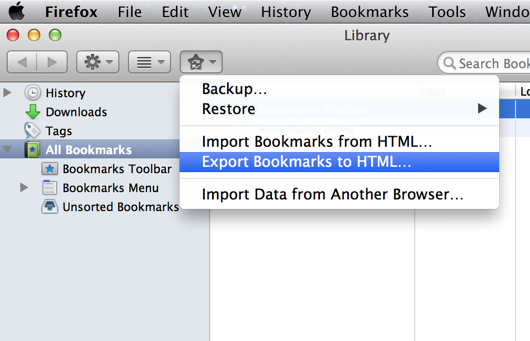
- Firefox users should go to Bookmarks>’Import and backup your bookmarks’ and select ‘Export bookmarks to HTML’ from the dropdown menu.
- In Safari, just go to Safari>File> Export Bookmarks.
- You can also import your bookmarks with a drag-and-drop method for which you should log into your Evernote account, which needs a username and password.
- That is all! Now, you can find all the imported bookmarks from the browsers in the Evernote Account, which can be accessed from anywhere and anytime.
Download BookNote Importer and get started now.
This post was last modified on June 24, 2023 7:43 AM