
Now you can block WhatsApp Contacts on iPhone, iPad with iPhone 6, 6 Plus, 5S, 5C, iPad, iPad Mini, iPad Air, iPad Mini 2 & other iDevices supported models.


Block WhatsApp Contacts on iPhone
WhatsApp is widely popular as the best instant messaging client for iOS/Android/Windows Phone and other mobile platforms. While Hike Messenger, WeChat, Line and other are catching up, WhatsApp still remains as the King. WhatsApp can be installed on iPhone, iPad or any iDevices directly by going through iTunes/App Store to send unlimited free messages, videos, images, location to other contacts. The following is dedicated on how to block WhatsApp Contacts, also guide on how to unblock it on iPhone/iPad.
So why would you like to block contacts? Blocking contact on WhatsApp for iPhone means that the particular people will not be able to send you any messages via this mean of communication. So, people who are causing you trouble, this can be a life saver, at least for those beautiful girls out there.
So follow the process mentioned below to achieve that –
- Open WhatsApp on your iPhone.
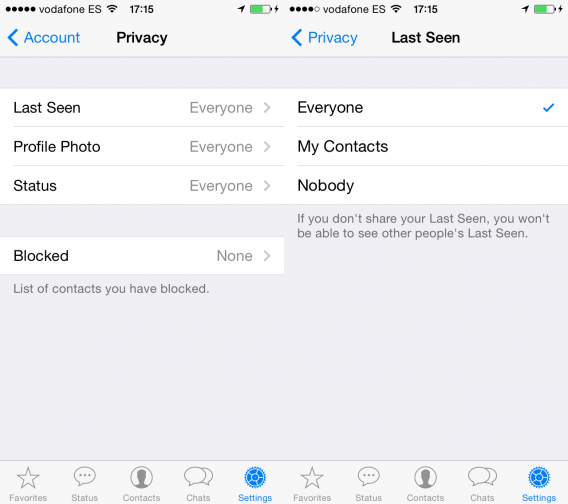
- Tap on Settings and then tap on Account.
- You will see the Privacy option.
- Among various Privacy options tap on Blocked option.
- Now select a number by clicking on Add New.
- The whole list of your contacts that are using WhatsApp will appear. Tap on any contact to block it.

UnBlock WhatsApp Contacts on iPhone
Follow the process mentioned below to unlock contacts on WhatsApp for iPhone –
- Follow the process mentioned above till Privacy Tab.
- In Privacy tab, select Blocked to open contacts which are blocked.
- Swipe on WhatsApp contacts your want to Unblock.
- Tap on Unblock option.
So that’s was the quick guide on how you can block/unblock contacts on WhatsApp for iPhone. The same guide works for WhatsApp Plus as well.
This post was last modified on June 22, 2022 5:27 PM