

In this guide check out How to Disable Comments on WordPress Blog.
If you want to disable comments from your WordPress blog then you have to do nothing but follow some easy steps. There are so many methods to disable comments on WordPress and here are some of them as follows –
First Method
In the very first method you need nothing but to edit page option, then go to discussion box and uncheck “Allow comments”. This is the quickest and simplest method for disabling the comments.

In case you are unable to find discussion Meta option in your dashboard, then you have to tweak settings. There will be a “Screen option” at the top right corner of your screen, just go on that option.
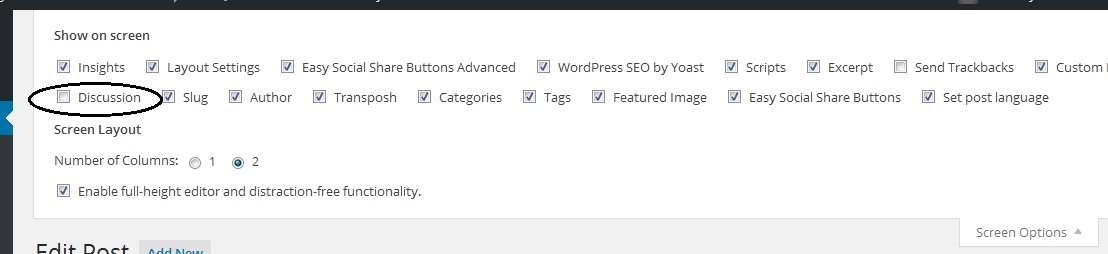
There you can find so many options and between all the options you will see discussion option. Make sure the discussion option is checked and if it is not then you have to check it.
Second Method
If you want to disable the comments option from all of your pages or posts then you need to open all the pages one by one by clicking the same then find the “Quick Edit” button and click it.
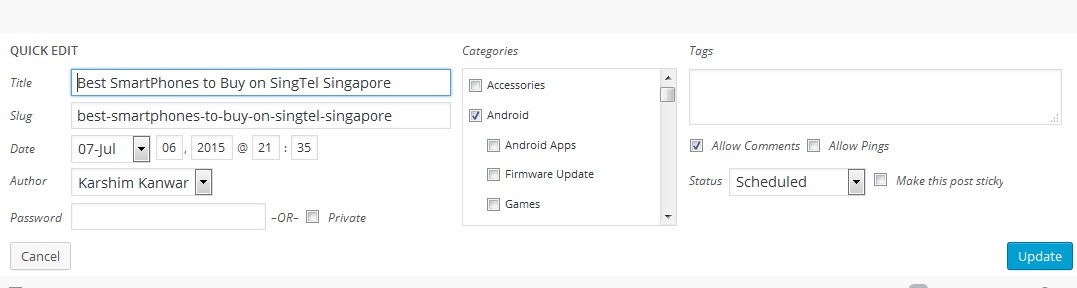
There, you will find a check box of allowing comments which are by default checked, you just have to uncheck it and save the changes by clicking the update button.
Third Method
Permanently Disable Comments on WordPress Blog
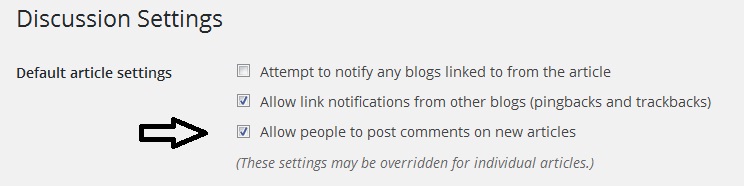
If you want to disable the comment option for upcoming posts or pages then you have to go on settings then go to discussion option and uncheck the “Allow people to post comments on new articles“. However you can enable the same whenever you want.
So that was a simple guide on how to disable comments on WordPress blog.
This post was last modified on May 19, 2018 9:53 AM